Factories > Infrastructure
Warp Factories infrastructure and security
# Warp Factories infrastructure and security Warp Factories runs on the infrastructure your team chooses. You decide where a factory runs code, which model providers serve its inference requests, and which credentials each agent receives. Warp coordinates the work and stores run data such as transcripts and artifacts. ## Control plane and execution plane Every factory splits responsibilities across two planes: * **Control plane** - Warp coordinates runs, identity and configuration, observability, integrations, storage, and inference routing. * **Execution plane** - A Warp-hosted sandbox or a managed self-hosted worker checks out code, runs setup, invokes tools, builds the project, and executes commands. ```mermaid flowchart LR I["Integrations and triggers"] --> C["Warp control plane<br/>coordination · identity/config<br/>observability · inference routing"] C --> H["Warp-hosted sandbox"] C -->|"task, config, and scoped<br/>runtime credentials"| S["Managed self-hosted worker"] H -->|"results, transcripts,<br/>artifacts, telemetry"| C S -->|"results, transcripts, attachments,<br/>artifacts, and telemetry<br/>can contain code context"| C C --> P["Warp-managed or<br/>customer-configured inference"] C --> D["Warp-managed storage"] ``` With managed self-hosting, repository checkouts, commands, and sandbox files stay on machines you control. Prompts, results, transcripts, attachments, artifacts, and telemetry still flow through Warp and configured providers. See [deployment patterns](/factories/deployment-patterns/), [execution security](/platform/execution-security/), and the [data security and boundaries](/platform/architecture/#data-security-and-boundaries) reference for details.  ## Runners A runner selects the operating system, architecture, sandbox image, and vCPU and memory shape. The factory's [definition](/factories/factory-as-code/) supplies repositories, setup commands, and secrets. Define runners in `runners/*.yaml`; `agentDefaults.runner` sets the default, and agents and automations can override it. The execution host determines how each setting is used: | Setting | Warp-hosted | Direct | Kubernetes | Docker | | --- | --- | --- | --- | --- | | `platform.os`, `platform.arch`, `platform.mac.version` | Selects the sandbox OS, architecture, and macOS VM version | Does not configure the host; the worker host determines the platform | Use Linux; the cluster and `pod_template` schedule nodes | Use Linux; the Docker daemon determines the architecture | | `platform.linux.dockerImage` | Linux sandbox image | Ignored | Task and setup container image | Task container image | | `platform.linux.registryCredentialSecretName` | Warp-managed private-registry credential | Ignored | Ignored; use `imagePullSecrets` | Ignored; configure registry credentials on the worker, such as in its Docker config | | `instanceShape` | Sandbox size, subject to plan limits; omitted uses the workspace default | Ignored; the task uses host resources | Task-container requests and limits; overrides matching `pod_template` resources; omitted keeps template or cluster defaults | Task-container limits; omitted adds no limits | Self-hosted runner settings do not provision worker capacity. Worker configuration controls host resources, registry authentication, volumes, node placement, and other backend policy. ## Choose an execution host A factory runs its work on one of two execution hosts: Warp-hosted compute or a worker in the [managed self-hosting architecture](/factories/self-hosting/#managed-architecture). | Decision area | Warp-hosted | Managed self-hosted | | --- | --- | --- | | **Compute** | Warp provisions the sandbox | Your team provisions the worker | | **Checkout and commands** | Run on Warp-managed compute | Run on your infrastructure | | **Network** | Warp manages sandbox connectivity | The worker connects outbound to Warp; no inbound firewall port | | **Private services** | Must be reachable from the hosted sandbox | Reachable through the worker's network access | | **Operations** | Warp manages capacity and lifecycle | Your team manages capacity, isolation, updates, and availability | To route factory work to a managed self-hosted worker (an Enterprise feature): 1. **Deploy a worker** - Review the [self-hosting requirements](/factories/self-hosting/), then connect a worker that authenticates to Warp with a self-hosted worker API key. Workers run on `linux/amd64` and `linux/arm64`, and the worker's platform determines which workloads it can run. 2. **Pair it with a compatible runner** - Choose a runner that matches the worker's platform. 3. **Select the worker in the factory definition** - Set [`workerHost`](/factories/factory-as-code/) so the factory routes work to it. For a working definition with `workerHost` set and a platform-matched runner, see [`07-self-hosted-worker`](https://github.com/warpdotdev/warp-factory-examples/tree/main/examples/07-self-hosted-worker). Unmanaged self-hosted agents and other CLI agents can't serve as a factory's execution host, but they can exchange work with a factory through [Factory MCP](/factories/factory-mcp/). ### Managed self-hosting structures Factories use managed self-hosting, so Warp still orchestrates their runs. The worker backend sets isolation and scheduling on your infrastructure: | Structure | How factory runs execute | What your team operates | Use it when | | --- | --- | --- | --- | | **[Docker](/factories/self-hosting/managed-docker/)** (default) | In a separate Docker container on the worker host | The worker daemon, host, Docker daemon, images, capacity, and container policy | Docker is available and you want per-run container isolation without Kubernetes | | **[Kubernetes](/factories/self-hosting/managed-kubernetes/)** | As a Kubernetes Job in the worker's namespace | The worker deployment, cluster, namespace RBAC, scheduling, admission policy, and capacity | Your team already operates Kubernetes or needs cluster-native policy and scheduling | | **[Direct](/factories/self-hosting/managed-direct/)** | In a separate workspace directly on the worker host, sharing its OS and kernel | The worker daemon, host security, dependencies, capacity, and cleanup | A container runtime isn't available or runs need direct access to host resources | ## Choose inference independently Execution hosting doesn't select inference. Configure that boundary separately. ### Inference options for factory runs Factory agents execute as cloud agents, so only inference options that support cloud agent runs apply: | Option | Support for factory runs | Team controls | Key boundary | | --- | --- | --- | --- | | **Warp-managed inference** | Supported | The model selected for each agent | Warp provides the provider account and bills model usage with Warp credits | | **[Team-managed keys and endpoints](/enterprise/enterprise-features/team-managed-keys-and-endpoints/)** | Supported on Business and Enterprise | Shared OpenAI, Anthropic, or Google keys, or an OpenAI-compatible endpoint | Warp stores the encrypted credential and uses it only at the inference boundary; it never enters the worker or run environment | | **[BYOLLM: AWS Bedrock](/enterprise/enterprise-features/byollm-aws-bedrock/)** | Supported on Enterprise | The AWS account, IAM role, available Claude models, and provider billing | Warp assumes your IAM role through OIDC; inference runs in your AWS account | | **[BYOLLM: Gemini Enterprise](/enterprise/enterprise-features/byollm-gemini-enterprise/)** | Not supported for factory runs | Interactive inference in your Google Cloud project | Gemini Enterprise BYOLLM currently supports interactive agent requests only | Self-serve BYOK and custom inference endpoints are stored on an individual member's device and don't apply to factory runs. With team-managed keys and endpoints, select a specific provider model or endpoint; Auto continues to use Warp-managed inference. When you supply the provider, its retention follows your account and contract, and Warp can't enforce ZDR for that provider. ## Credential boundaries A factory handles four kinds of credentials, each with its own boundary: | Credential | Used for | Boundary | | --- | --- | --- | | **Inference credentials** | Model provider requests | Used only at the inference boundary; never injected into the sandbox | | **Execution secrets** | APIs, package registries, and tools an agent uses | Delivered from an explicit per-agent allowlist; factory agents that don't act as a specific user receive no managed secrets by default | | **Harness authentication** | Third-party harnesses such as Claude Code or Codex | Configured separately from the agent's secret allowlist | | **Repository identity** | Checking out code and pushing changes | Runs act with the creating user's authorization (changes are attributed to them) or as the agent itself for unattended work; set by the definition's [`credentialStrategy`](/factories/factory-as-code/#credentialstrategy) | Scope each credential to the resources and actions its agent needs. Warp redacts known secret values at output boundaries, but redaction is a backstop, not a substitute for narrow external permissions and rotation. See [cloud agent secrets](/platform/secrets/), [harness authentication](/platform/harnesses/authentication/), [secret redaction](/support-and-community/privacy-and-security/secret-redaction/), and [team identity](/platform/team-access-billing-and-identity/) for the underlying controls. ## Governance and metering Factory creation uses the team-level Warp Factories role. Team and workspace admins and members with the team-level Editor role can create factories. Three roles govern an existing factory: * **User** - View and run the factory, and propose definition changes. * **Editor** - Configure the factory, its agents, repositories, automations, integrations, secrets, MCP servers, and runners. * **Admin** - Manage members, delete the factory, and force-merge a blocked definition change. Team and workspace admins and owners always have the Admin role. Admins for a factory manage its roles; team and workspace admins manage the team-level role. Creating or editing shared runners and connecting team-wide integrations and providers remain team or workspace permissions. Factory roles don't determine who reviews specifications or approves pull request merges; those stay in workflow and repository policy. Warp meters hosted compute, Warp-provided inference, and platform services. Managed self-hosted execution moves compute costs to your own infrastructure, and customer-supplied inference bills model usage through your provider account. Platform services consume credits regardless of these choices. See [platform credits](/support-and-community/plans-and-billing/platform-credits/) for details. ## Related pages * [**Deployment patterns**](/factories/deployment-patterns/) - Compare Warp-hosted, managed self-hosted, and CLI-only execution. * [**Managed self-hosting**](/factories/self-hosting/) - Choose a worker backend and follow its setup guide. * [**Execution security**](/platform/execution-security/) - Review data boundaries, network egress, and backend-specific controls. * [**Bring Your Own LLM**](/enterprise/enterprise-features/bring-your-own-llm/) - Compare customer-owned inference options and provider support. * [**Enterprise security overview**](/enterprise/security-and-compliance/security-overview/) - Review data handling, ZDR, compliance, and access controls across Warp. * [Team-managed model keys and endpoints](/enterprise/enterprise-features/team-managed-keys-and-endpoints/) - Configure customer-supplied inference credentials.Tell me about this feature: https://docs.warp.dev/factories/infrastructure-and-security/Warp Factories gives you control over inference and execution hosting while Warp stores run records, transcripts, and outputs.
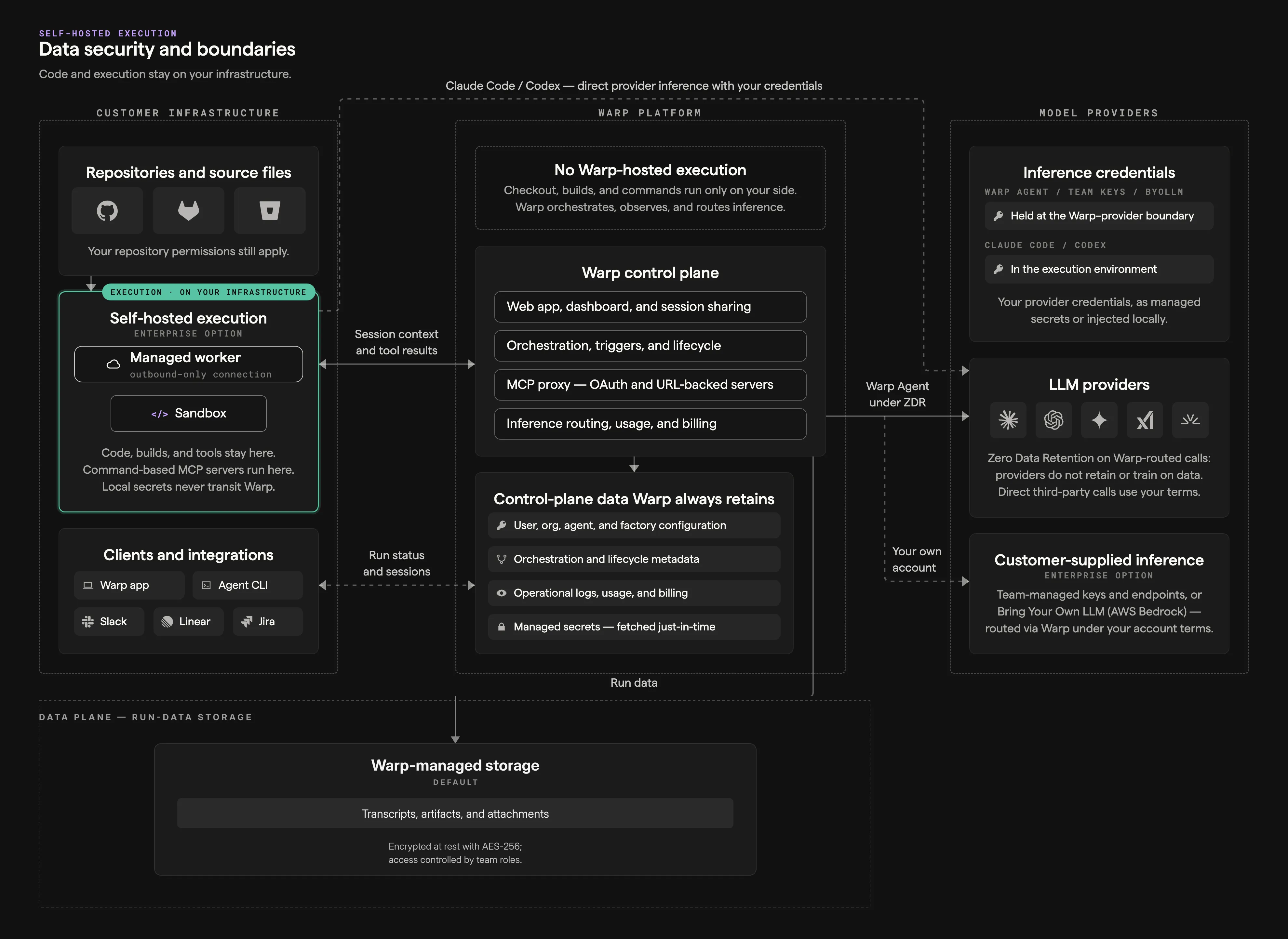
Warp Factories runs on the infrastructure your team chooses. You decide where a factory runs code, which model providers serve its inference requests, and which credentials each agent receives. Warp coordinates the work and stores run data such as transcripts and artifacts.
Control plane and execution plane
Section titled “Control plane and execution plane”Every factory splits responsibilities across two planes:
- Control plane - Warp coordinates runs, identity and configuration, observability, integrations, storage, and inference routing.
- Execution plane - A Warp-hosted sandbox or a managed self-hosted worker checks out code, runs setup, invokes tools, builds the project, and executes commands.
flowchart LR
  I["Integrations and triggers"] --> C["Warp control plane<br/>coordination · identity/config<br/>observability · inference routing"]
  C --> H["Warp-hosted sandbox"]
  C -->|"task, config, and scoped<br/>runtime credentials"| S["Managed self-hosted worker"]
  H -->|"results, transcripts,<br/>artifacts, telemetry"| C
  S -->|"results, transcripts, attachments,<br/>artifacts, and telemetry<br/>can contain code context"| C
  C --> P["Warp-managed or<br/>customer-configured inference"]
  C --> D["Warp-managed storage"]
With managed self-hosting, repository checkouts, commands, and sandbox files stay on machines you control. Prompts, results, transcripts, attachments, artifacts, and telemetry still flow through Warp and configured providers. See deployment patterns, execution security, and the data security and boundaries reference for details.
Runners
Section titled “Runners”A runner selects the operating system, architecture, sandbox image, and vCPU and memory shape. The factory’s definition supplies repositories, setup commands, and secrets. Define runners in runners/*.yaml; agentDefaults.runner sets the default, and agents and automations can override it. The execution host determines how each setting is used:
| Setting | Warp-hosted | Direct | Kubernetes | Docker |
|---|---|---|---|---|
platform.os, platform.arch, platform.mac.version | Selects the sandbox OS, architecture, and macOS VM version | Does not configure the host; the worker host determines the platform | Use Linux; the cluster and pod_template schedule nodes | Use Linux; the Docker daemon determines the architecture |
platform.linux.dockerImage | Linux sandbox image | Ignored | Task and setup container image | Task container image |
platform.linux.registryCredentialSecretName | Warp-managed private-registry credential | Ignored | Ignored; use imagePullSecrets | Ignored; configure registry credentials on the worker, such as in its Docker config |
instanceShape | Sandbox size, subject to plan limits; omitted uses the workspace default | Ignored; the task uses host resources | Task-container requests and limits; overrides matching pod_template resources; omitted keeps template or cluster defaults | Task-container limits; omitted adds no limits |
Self-hosted runner settings do not provision worker capacity. Worker configuration controls host resources, registry authentication, volumes, node placement, and other backend policy.
Choose an execution host
Section titled “Choose an execution host”A factory runs its work on one of two execution hosts: Warp-hosted compute or a worker in the managed self-hosting architecture.
| Decision area | Warp-hosted | Managed self-hosted |
|---|---|---|
| Compute | Warp provisions the sandbox | Your team provisions the worker |
| Checkout and commands | Run on Warp-managed compute | Run on your infrastructure |
| Network | Warp manages sandbox connectivity | The worker connects outbound to Warp; no inbound firewall port |
| Private services | Must be reachable from the hosted sandbox | Reachable through the worker’s network access |
| Operations | Warp manages capacity and lifecycle | Your team manages capacity, isolation, updates, and availability |
To route factory work to a managed self-hosted worker (an Enterprise feature):
- Deploy a worker - Review the self-hosting requirements, then connect a worker that authenticates to Warp with a self-hosted worker API key. Workers run on
linux/amd64andlinux/arm64, and the worker’s platform determines which workloads it can run. - Pair it with a compatible runner - Choose a runner that matches the worker’s platform.
- Select the worker in the factory definition - Set
workerHostso the factory routes work to it.
For a working definition with workerHost set and a platform-matched runner, see 07-self-hosted-worker.
Unmanaged self-hosted agents and other CLI agents can’t serve as a factory’s execution host, but they can exchange work with a factory through Factory MCP.
Managed self-hosting structures
Section titled “Managed self-hosting structures”Factories use managed self-hosting, so Warp still orchestrates their runs. The worker backend sets isolation and scheduling on your infrastructure:
| Structure | How factory runs execute | What your team operates | Use it when |
|---|---|---|---|
| Docker (default) | In a separate Docker container on the worker host | The worker daemon, host, Docker daemon, images, capacity, and container policy | Docker is available and you want per-run container isolation without Kubernetes |
| Kubernetes | As a Kubernetes Job in the worker’s namespace | The worker deployment, cluster, namespace RBAC, scheduling, admission policy, and capacity | Your team already operates Kubernetes or needs cluster-native policy and scheduling |
| Direct | In a separate workspace directly on the worker host, sharing its OS and kernel | The worker daemon, host security, dependencies, capacity, and cleanup | A container runtime isn’t available or runs need direct access to host resources |
Choose inference independently
Section titled “Choose inference independently”Execution hosting doesn’t select inference. Configure that boundary separately.
Inference options for factory runs
Section titled “Inference options for factory runs”Factory agents execute as cloud agents, so only inference options that support cloud agent runs apply:
| Option | Support for factory runs | Team controls | Key boundary |
|---|---|---|---|
| Warp-managed inference | Supported | The model selected for each agent | Warp provides the provider account and bills model usage with Warp credits |
| Team-managed keys and endpoints | Supported on Business and Enterprise | Shared OpenAI, Anthropic, or Google keys, or an OpenAI-compatible endpoint | Warp stores the encrypted credential and uses it only at the inference boundary; it never enters the worker or run environment |
| BYOLLM: AWS Bedrock | Supported on Enterprise | The AWS account, IAM role, available Claude models, and provider billing | Warp assumes your IAM role through OIDC; inference runs in your AWS account |
| BYOLLM: Gemini Enterprise | Not supported for factory runs | Interactive inference in your Google Cloud project | Gemini Enterprise BYOLLM currently supports interactive agent requests only |
Self-serve BYOK and custom inference endpoints are stored on an individual member’s device and don’t apply to factory runs. With team-managed keys and endpoints, select a specific provider model or endpoint; Auto continues to use Warp-managed inference. When you supply the provider, its retention follows your account and contract, and Warp can’t enforce ZDR for that provider.
Credential boundaries
Section titled “Credential boundaries”A factory handles four kinds of credentials, each with its own boundary:
| Credential | Used for | Boundary |
|---|---|---|
| Inference credentials | Model provider requests | Used only at the inference boundary; never injected into the sandbox |
| Execution secrets | APIs, package registries, and tools an agent uses | Delivered from an explicit per-agent allowlist; factory agents that don’t act as a specific user receive no managed secrets by default |
| Harness authentication | Third-party harnesses such as Claude Code or Codex | Configured separately from the agent’s secret allowlist |
| Repository identity | Checking out code and pushing changes | Runs act with the creating user’s authorization (changes are attributed to them) or as the agent itself for unattended work; set by the definition’s credentialStrategy |
Scope each credential to the resources and actions its agent needs. Warp redacts known secret values at output boundaries, but redaction is a backstop, not a substitute for narrow external permissions and rotation. See cloud agent secrets, harness authentication, secret redaction, and team identity for the underlying controls.
Governance and metering
Section titled “Governance and metering”Factory creation uses the team-level Warp Factories role. Team and workspace admins and members with the team-level Editor role can create factories.
Three roles govern an existing factory:
- User - View and run the factory, and propose definition changes.
- Editor - Configure the factory, its agents, repositories, automations, integrations, secrets, MCP servers, and runners.
- Admin - Manage members, delete the factory, and force-merge a blocked definition change.
Team and workspace admins and owners always have the Admin role. Admins for a factory manage its roles; team and workspace admins manage the team-level role.
Creating or editing shared runners and connecting team-wide integrations and providers remain team or workspace permissions. Factory roles don’t determine who reviews specifications or approves pull request merges; those stay in workflow and repository policy.
Warp meters hosted compute, Warp-provided inference, and platform services. Managed self-hosted execution moves compute costs to your own infrastructure, and customer-supplied inference bills model usage through your provider account. Platform services consume credits regardless of these choices. See platform credits for details.
Related pages
Section titled “Related pages”- Deployment patterns - Compare Warp-hosted, managed self-hosted, and CLI-only execution.
- Managed self-hosting - Choose a worker backend and follow its setup guide.
- Execution security - Review data boundaries, network egress, and backend-specific controls.
- Bring Your Own LLM - Compare customer-owned inference options and provider support.
- Enterprise security overview - Review data handling, ZDR, compliance, and access controls across Warp.
- Team-managed model keys and endpoints - Configure customer-supplied inference credentials.